Alphabet Canva Frame Template: Elevating Sublimation and Personalized Design
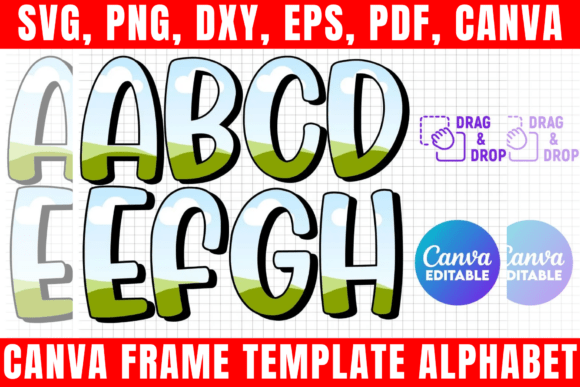
Creating custom lettering for sublimation projects often involves a tedious cycle of searching for fonts, tracing letters in vector software, and hoping the final cut line is clean. The Alphabet Canva Frame Template changes this workflow entirely by turning typography into a functional container. Rather than treating letters as static text elements, this template transforms each character of the alphabet into an editable frame. This means you can drag and drop photos, patterns, textures, or gradients directly inside the letterform without needing advanced masking skills or external graphic design software.
For crafters and small business owners, the distinction between a standard font and a fill-in alphabet Canva frame template is significant. Standard fonts require complex layering to achieve a patterned look, whereas this template has the clipping mask pre-built. You simply select the letter you need, drop in your chosen fill pattern or image, and export. This functionality bridges the gap between professional graphic design capabilities and accessible, user-friendly crafting tools, making high-end monograms and personalized décor achievable in minutes rather than hours.
Real-World Applications for Crafters and Makers
The most immediate application for this template lies in the sublimation community. Sublimation relies heavily on vibrant, full-color designs that transfer permanently onto polyester substrates. When creating personalized tumblers, keychains, or garden flags, plain block letters can sometimes look flat or unfinished. By using the Alphabet Canva Frame Template, a maker can fill a customer’s initial with a matching floral pattern, a glitter texture, or even a photo of their pet. This adds a layer of customization that justifies higher price points and distinguishes handmade goods from mass-produced alternatives.
Consider a scenario where you are fulfilling an order for a bridal party. The bride wants elegant, gold-glitter initials on white satin robes. Instead of trying to find a gold glitter font that prints correctly on your specific printer and paper combination, you can use the template to fill the letters with a high-resolution digital glitter texture. The result is crisp, consistent, and perfectly aligned. Because the template includes a PNG file with a transparent background, these designs integrate seamlessly into larger compositions without awkward white boxes or jagged edges around the lettering.
Streamlining Production for Small Businesses
Time is the most valuable resource for anyone selling physical products. The Block Shadow Font style included in this template offers a bold, retro aesthetic that is currently trending in apparel and sticker design. However, recreating this specific shadow effect manually for every new name or phrase is inefficient. Having a pre-formatted Fill-in Alphabet Canva Frame Template allows for rapid prototyping. You can test how different patterns look within the block shadow structure instantly, allowing you to present multiple options to clients during the approval phase without spending hours on revisions.
This efficiency extends to inventory management as well. Because the template is formatted for standard 8.5 x 11 sheets, it aligns perfectly with common sublimation paper sizes and heat press platens. You can arrange multiple filled letters on a single canvas to maximize paper usage and reduce waste. For businesses producing vinyl decals using Cricut or Silhouette machines, the included SVG and DXF files ensure that the cut lines are optimized. The letters are already converted to paths, eliminating the common frustration of text shifting or fonts failing to load when transferring files between devices.
Versatility Across Different Creative Industries
While sublimation is a primary use case, the utility of an editable Canva frame alphabet extends far beyond heat transfer projects. Teachers and educators frequently use these templates to create engaging classroom materials. A teacher could fill alphabet frames with pictures of animals, historical figures, or scientific symbols to create custom flashcards or bulletin board displays. The ability to swap out the internal image while maintaining a consistent typographic style helps reinforce visual learning without requiring the educator to be a graphic designer.
In the realm of digital content creation, social media managers and influencers utilize these templates for cohesive branding. Instagram carousel posts, Pinterest pins, and YouTube thumbnails often benefit from bold, textured typography that stops the scroll. Using the Alphabet Canva Frame Template ensures that headline letters match the brand’s color palette and texture library exactly. Since the template is cloud-based via the Canva link, teams can collaborate on designs remotely, ensuring brand consistency across all platforms without sharing massive source files.
Event planners also find immense value in this resource. From wedding seating charts to corporate conference badges, personalized lettering sets the tone for the event. The template allows planners to quickly mock up signage using actual event photography or themed textures as the letter fill. This visualization capability helps clients make confident decisions about décor investments. Furthermore, because the files include PDF versions with solid white backgrounds, these designs can be easily sent to professional print shops for large-format printing if the project exceeds home equipment capabilities.
Technical Considerations and Best Practices
Before diving into a project, it is helpful to understand the technical nuances of working with fill-in alphabet templates. While the drag-and-drop interface is intuitive, image quality remains paramount. When filling a letter frame, always use high-resolution source images. A low-quality photo stretched to fit a large block shadow font will appear pixelated when printed or cut. The template acts as a window; if the view through the window is blurry, the frame cannot fix it. Sourcing quality textures and photos specifically sized for sublimation or print ensures the final product retains its professional polish.
Users should also be mindful of licensing and file usage. This digital product grants lifetime access for creating physical end products, which is ideal for commercial crafters. However, the digital files themselves cannot be shared, sold, or transferred. This distinction protects the intellectual property of the designer while giving makers the freedom to monetize their physical creations. Always verify that any patterns or photos you drag into the frame also carry appropriate commercial licenses if you intend to sell the resulting physical items.
Compatibility is another practical consideration. While the Canva link offers the easiest editing experience, not every user prefers working in a browser. The inclusion of SVG, DXF, and PNG files provides essential flexibility. If you prefer working in Adobe Photoshop, CorelDraw, or Inkscape, the transparent PNG and vector SVG files allow you to incorporate the alphabet frames into your native workflow. Silhouette users will particularly appreciate the DXF format, as it opens cleanly in Silhouette Studio Basic Edition without requiring the Business Edition upgrade. Understanding which file format suits your specific hardware and software setup prevents compatibility headaches down the line.
Navigating Design Limitations
It is important to recognize what this template is and is not. It is a styling tool, not a font generator. You cannot type a sentence and have it automatically convert to frames; you must assemble words letter by letter. For long phrases or paragraphs, this method may be too time-consuming compared to traditional text tools. The Alphabet Canva Frame Template shines brightest with initials, short names, monograms, and accent words. Recognizing this scope helps manage expectations and ensures you use the right tool for the specific design task at hand.
Additionally, basic design software knowledge is recommended. While Canva is user-friendly, understanding concepts like layering, transparency, and export settings will significantly improve your results. Knowing when to use a PNG versus an SVG, or how to adjust the position of an image within the frame for the best visual crop, comes with practice. New users should take advantage of the instant digital download to experiment with different fills and exports before committing to a final client project. This exploration period builds familiarity with the template’s behavior and unlocks its full creative potential.